
https://docs.google.com/document/d/1Mm0mUXPFBYoTEMCy_4oxGHbhFtkIEcDt-aGTydTRjms/edit?tab=t.0
SOP: Reraising Return & Exchange (R/E) Requests
1. Purpose
To allow customers to re-raise Return or Exchange (R/E) requests for the second time on our D2C website/RP link, provided they are within the defined R/E policy window.
This enhancement reduces manual effort, improves TAT, and enhances customer experience.
2. Scope
This SOP applies to:
All D2C websites and RP links where R/E requests can be submitted
L1 & L2 Customer Support Teams
All brands under our platform
3. Background (Existing Process)
When a customer raises an R/E request that does not meet policy, L2 reviews and rejects the request with a reason.
The customer cannot re-raise the request on the website/RP link once rejected.
Customers then contact support via WhatsApp/Email with the required information, and the support team manually raises a new R/E request.
L2 validates again → Approves → RVP & refund/exchange processed.
4. New Process Overview
A new action, “Cancel Request” is available for L2.
Key Change
Instead of rejecting requests requiring additional/clearer information, L2 will now cancel the request.
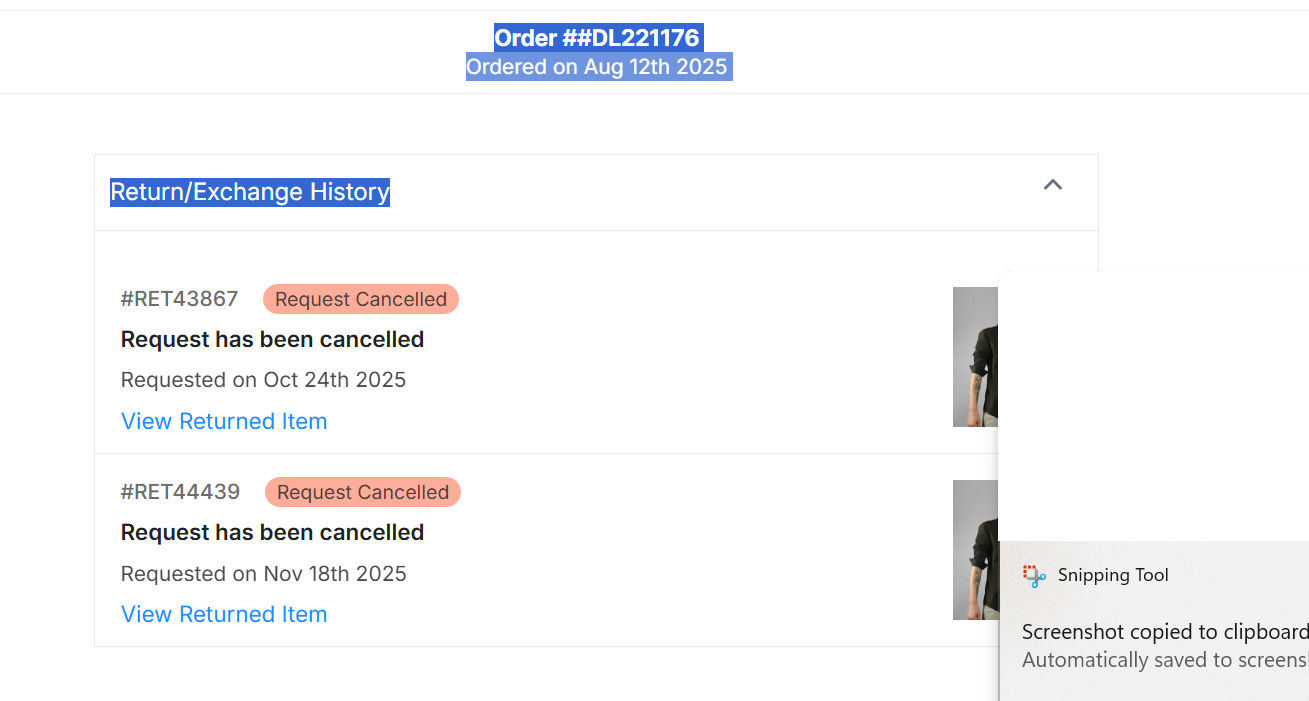
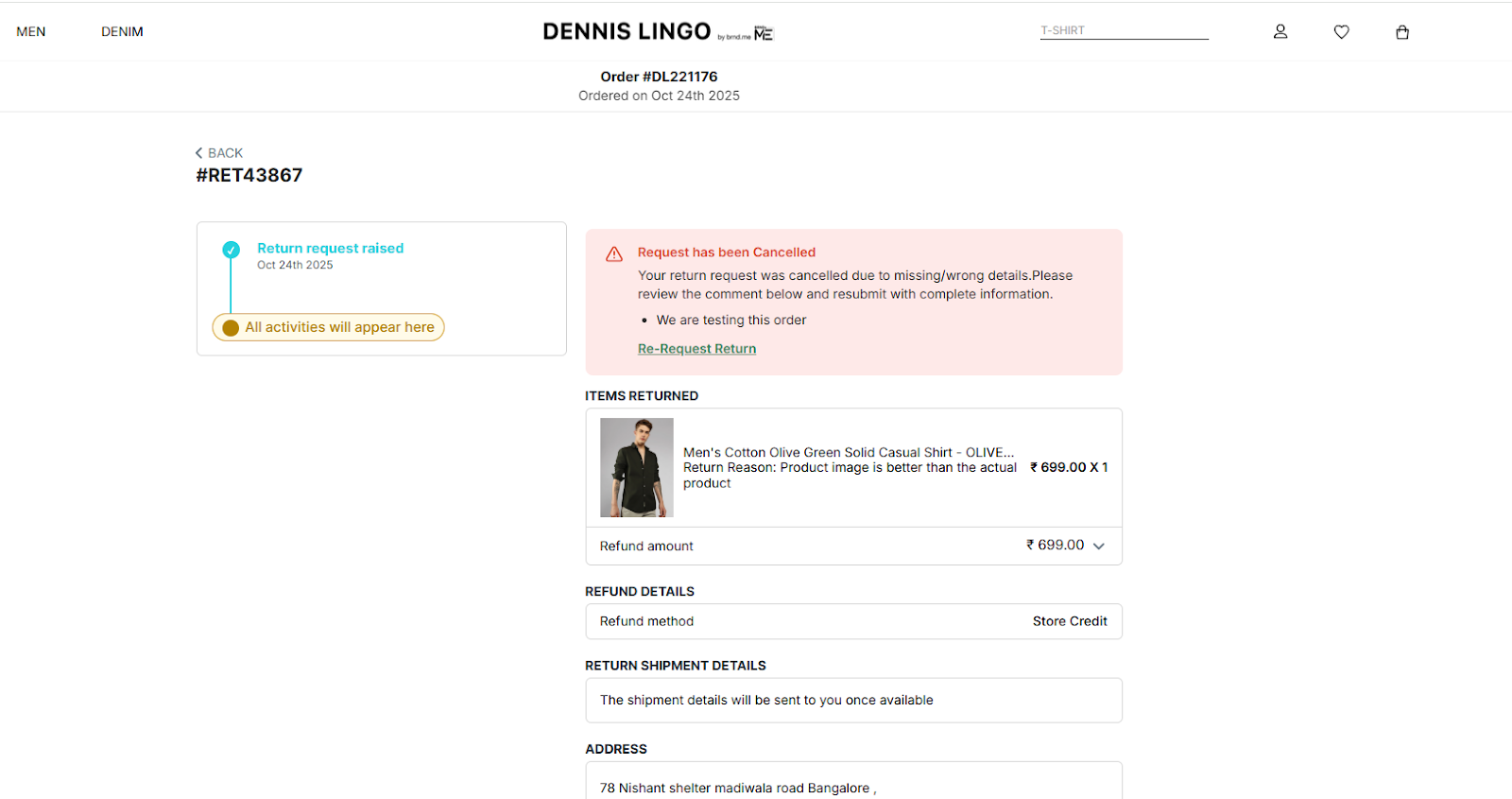
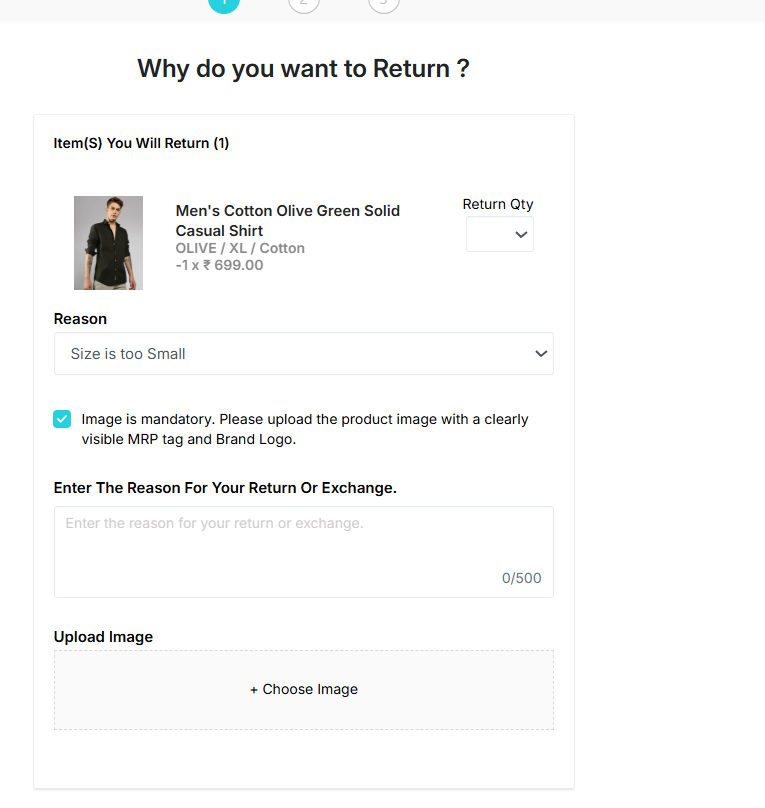
When a request is cancelled, the customer can re-submit the R/E request on the website/RP link with corrected details/images.
Customer must re-submit within the applicable R/E timeline.
5. R/E Window Rules
Example: 7-Day Return/Exchange Window
Note:
The second attempt after cancellation is allowed only once per order.
6. Roles & Responsibilities
6.1 L1 Team
Check RP window and see rejection/cancellation reasons.
Inform the customer why their request was cancelled.
Ask customer to submit correct information ASAP within the timeline.
L1 must not manually raise R/E requests anymore until edge cases where customer is facing challenges
WA/SM team will guide to raise requests and if raising mention the reason for manually raising on customer behalf
Guide customer on the correct steps or required images.
6.2 L2 Team
L2 has three actions: Approve / Reject / Cancel
A. Approval Criteria
Approve when:
Customer is within R/E timeline.
Images are clear, proper, with visible brand tags.
Issue is valid (e.g., wrong product shipped) and images match the claim.
B. Rejection Criteria
Reject when:
Request is out of R/E policy timeline (except cancellation second-attempt scenario).
Product is non-returnable / non-exchangeable as per brand policy.
Examples:Villain perfumes → “Don’t like the smell” is not valid.
Customer in NSP (Non-serviceable Pincode) area → Inform self-ship.
Wrong/Missing product cases →
Reject with escalation message
Escalate to WH for footage validation
C. Cancellation Criteria
Use “Cancel Request” ONLY in scenarios where we want to allow the customer to re-raise with correct details:
Image is not clear
Tag/brand name not visible
Missing required angles or supporting documents
Information mismatch that can be corrected
Any scenario where customer can fix the submission and reattempt
7. System Changes
A new button “Cancel Request” will be available for L2 across all brands.
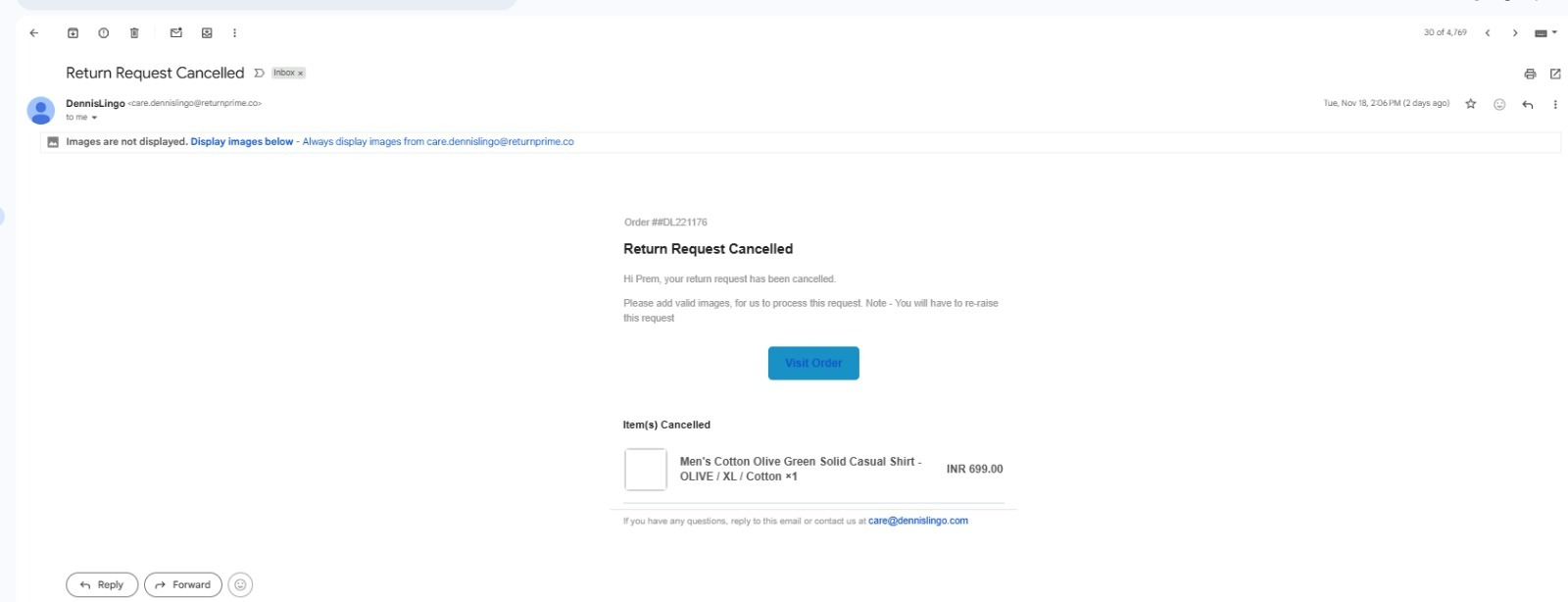
Cancellation triggers an email/SMS/notification to the customer prompting them to re-upload correct details.
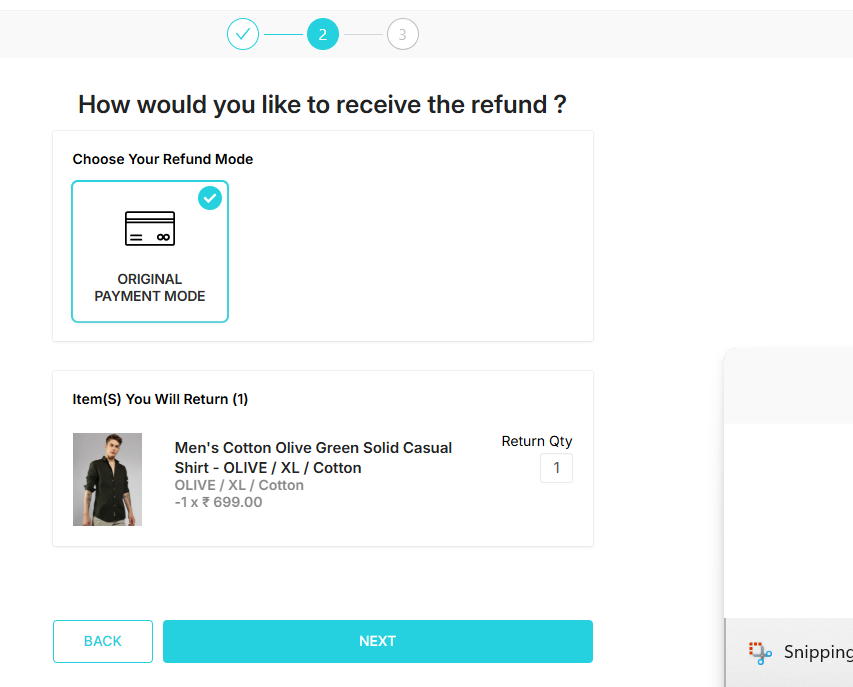
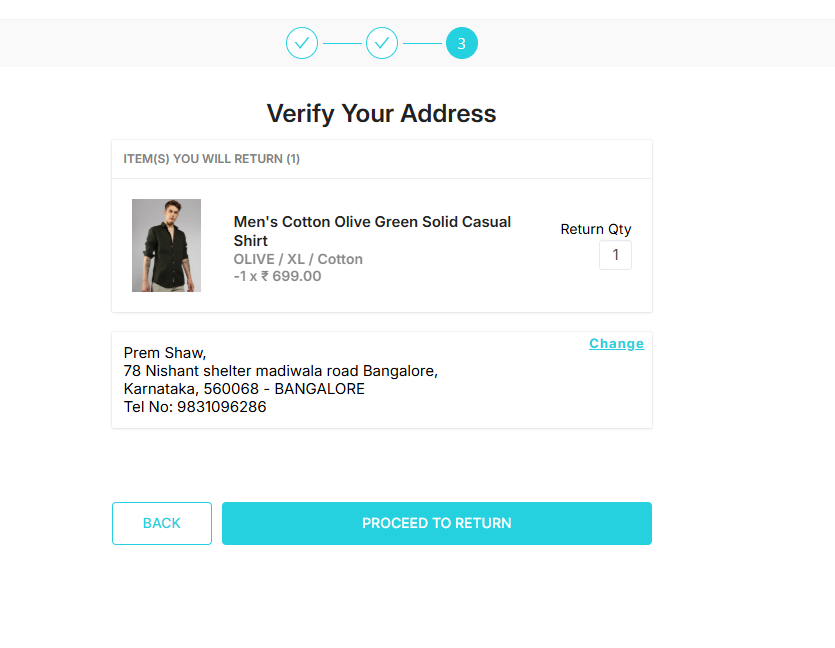
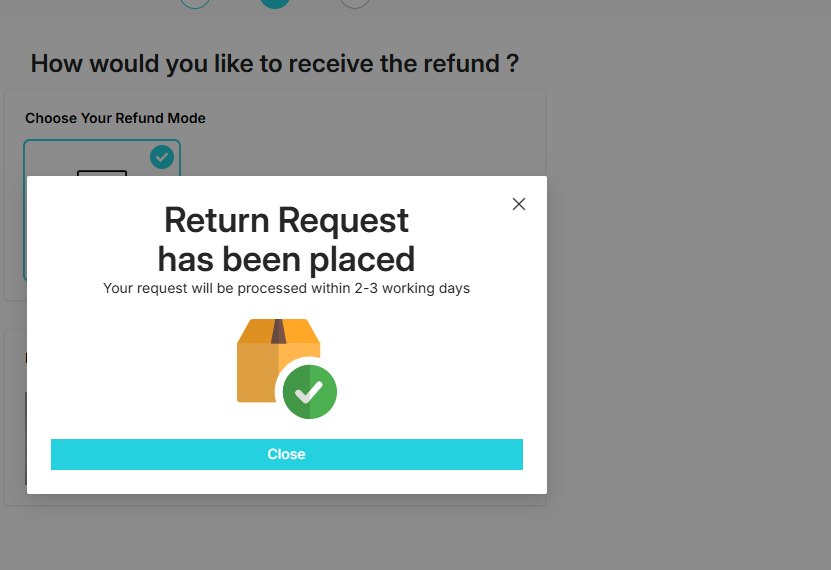
Screenshot how the order re raise looks like for customers
Mail stating it is cancelled
Templates to use while cancelling any requests.
Images/tag missing for L2
Hi there,
We’ve cancelled your request as the brand tag/image provided was not clear. Please re-raise the request within the applicable timeline. Kindly note, this will be the last chance to submit the required details.
Thank you for your cooperation.
Any other reason for L2
Hi there,
We’ve cancelled your request due to the following issue: {Reason Placeholder}.You may re-raise the request within the applicable timeline after correcting the above issue. Please note that this will be the final opportunity to resubmit the required details.
Thank you for your cooperation.